

A lot of business owners think, "Who would want to hack my small website?" It sounds reasonable, but it misses how most attacks work. Hackers rarely choose a target by name. They use automated tools that scan thousands of websites at once, looking for old plugins, weak passwords, and easy openings. If your site has one, you are on the list, whether you are a large company or a local shop.
The good news is that most WordPress hacks are preventable with basic habits. In this guide, we explain why WordPress sites get hacked, share 12 practical steps to protect yours, and show you what to do if something goes wrong.
No. WordPress core is actively maintained and receives security updates regularly. The problem is usually what surrounds it: outdated plugins and themes, weak passwords, poor hosting, and sites that nobody looks after. WordPress powers a huge number of websites, so it is also a popular target. That means security needs to be a habit, not a one-time task.
The WordPress project also publishes its own hardening guide, which covers passwords, file permissions, database security, backups, and monitoring. It is a useful reference if you want to go deeper than this article.
Understanding the common entry points makes it easier to close them:
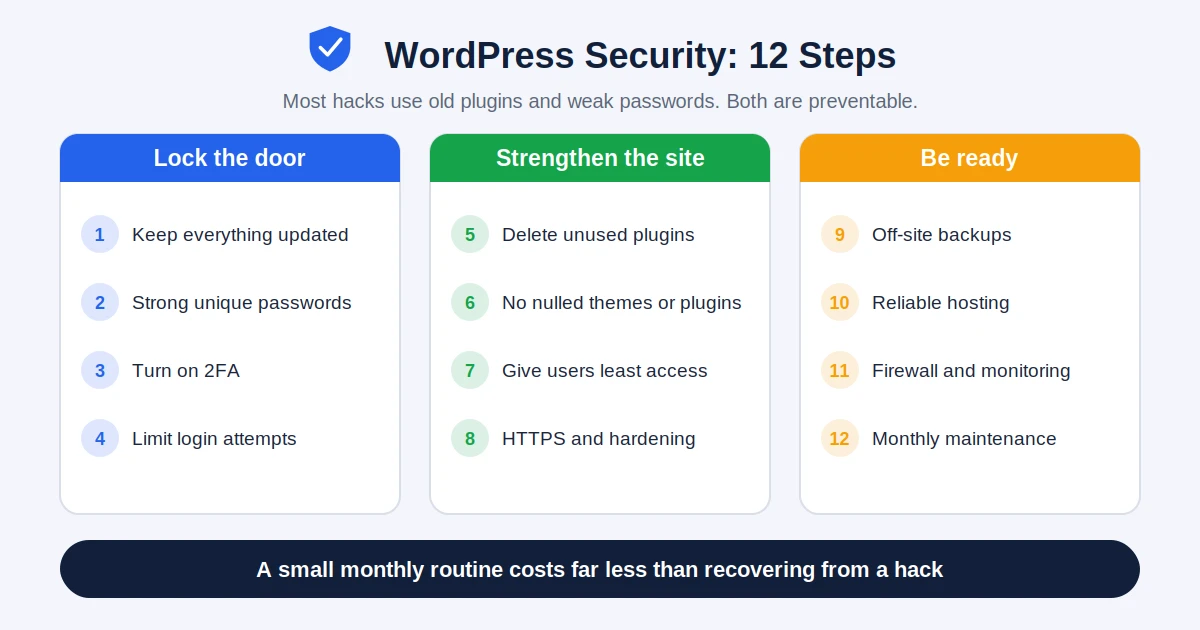
These first steps stop most automatic attacks.
Update WordPress core, plugins, and themes regularly. Most successful attacks use weaknesses that already have a fix available. The attacker simply counts on you not having installed it. Test updates on a staging copy first if your site is complex, and then update the live site without long delays.
Every account on your site, including admin, editors, hosting, and database, should have its own long and unique password. A password manager makes this easy. Avoid using "admin" as the username, because attackers try it first.
Two-factor authentication (2FA) asks for a second code from your phone when you log in. Even if someone steals your password, they cannot get in without that code. Enable it for all admin and editor accounts.
Bots try thousands of passwords in a short time. Limiting failed login attempts, or adding a CAPTCHA to the login page, stops this kind of guessing. Many reputable security plugins include this feature.
Next, reduce the ways an attacker could get in.
An inactive plugin can still be a risk, because its files remain on your server. If you are not using it, delete it, not just deactivate it. Fewer plugins also means a faster website, which supports our advice in the guide on website speed and Core Web Vitals.
A free copy of a paid theme looks like a bargain, but it often contains hidden backdoors that give attackers control of your site. Buy from the original developer or use trusted sources, and keep your licence active so you receive security updates.
Not everyone needs to be an administrator. A writer only needs editor or author access. Review your user list regularly and remove accounts of people who no longer work with you. Fewer powerful accounts means fewer ways in.
An SSL certificate encrypts the data between your visitors and your site, and it is also expected by browsers and search engines. Beyond that, a developer can add further protection, such as turning off the built-in file editor in the WordPress dashboard, setting correct file permissions, and disabling features you do not use. These are the kind of measures described in the official hardening documentation mentioned above.
No site is 100% safe, so preparation matters as much as prevention.
A backup is your safety net. Keep copies of both files and database, store them away from your web server, and test that you can actually restore them. The best backup is one you have already checked.
Cheap hosting can mean shared servers with weak isolation, slow patching, and no monitoring. Good hosting includes server-level security, regular updates, backups, and support that responds quickly. If you are comparing options, remember that the lowest price is rarely the best value.
A reputable security plugin or a web application firewall can block known bad traffic, scan for malware, and alert you to suspicious changes. Choose one well-reviewed solution rather than several that overlap. Also keep an eye on login activity and file changes so you notice problems early.
Security is not a one-time project. Set a simple monthly routine: apply updates, check backups, review users, scan for malware, and look at your uptime. If you do not have the time, a maintenance plan with a trusted team is often cheaper than recovering from a hack. When planning your budget, include this ongoing cost, as we explain in our guide to website cost and timeline.
If you notice strange redirects, spam pages, or a warning in search results, stay calm and act in order:
If you are not confident doing this yourself, it is best to ask a professional. A rushed fix can leave hidden backdoors behind.
A hacked site hurts more than your reputation. Spam pages can damage your search visibility, browsers may show warnings that scare visitors away, and an online store can lose customers' trust quickly. If you sell online, security is even more important. We touch on this in our comparison of WooCommerce vs Shopify, where platform choice affects how much security work falls on you.
Yes, when it is maintained properly. WordPress core receives regular security updates. Most problems come from outdated plugins, weak passwords, pirated themes, and neglected sites rather than from WordPress itself.
Check for updates at least weekly and apply security updates as soon as they are available. For complex sites, test updates on a staging copy first, then update the live site without long delays.
It is strongly recommended. A good security plugin or firewall can block bad traffic, scan for malware, and alert you to suspicious changes. Use one reputable solution and combine it with updates, strong passwords, and backups.
Common signs include unexpected redirects, strange pages or links you did not create, new admin users, a sudden drop in traffic, warnings from browsers or Google, and your hosting provider suspending the site.
Usually yes, especially if you have a clean backup. The important part is finding and fixing how the attacker got in, then changing all passwords and monitoring the site afterwards.
You do not need to be a technical expert to protect your WordPress website. Updates, strong passwords with 2FA, trusted plugins, good hosting, and tested backups will stop the large majority of attacks. The key is consistency: a small monthly routine is far cheaper than recovering from a serious hack.
If you would rather leave this to professionals, the team at Alien Web Solutions can audit your WordPress site, fix security gaps, and set up ongoing protection and maintenance. Get in touch and we will help you keep your website safe.
