

Ask any developer who has migrated a Shopify app from REST to GraphQL, and they will tell you the same thing: fewer requests, cleaner data, and noticeably faster load times. The Shopify GraphQL API has become the standard way to build apps, themes, and integrations that scale — yet many teams still treat it as an optional upgrade rather than the foundation it has become.
This guide shares practical Shopify GraphQL API tips for developers: what the API actually does, how it differs from REST, and which queries you will use most often. Whether you are building your first app or optimising an existing Shopify GraphQL integration, the goal here is practical clarity, not jargon.
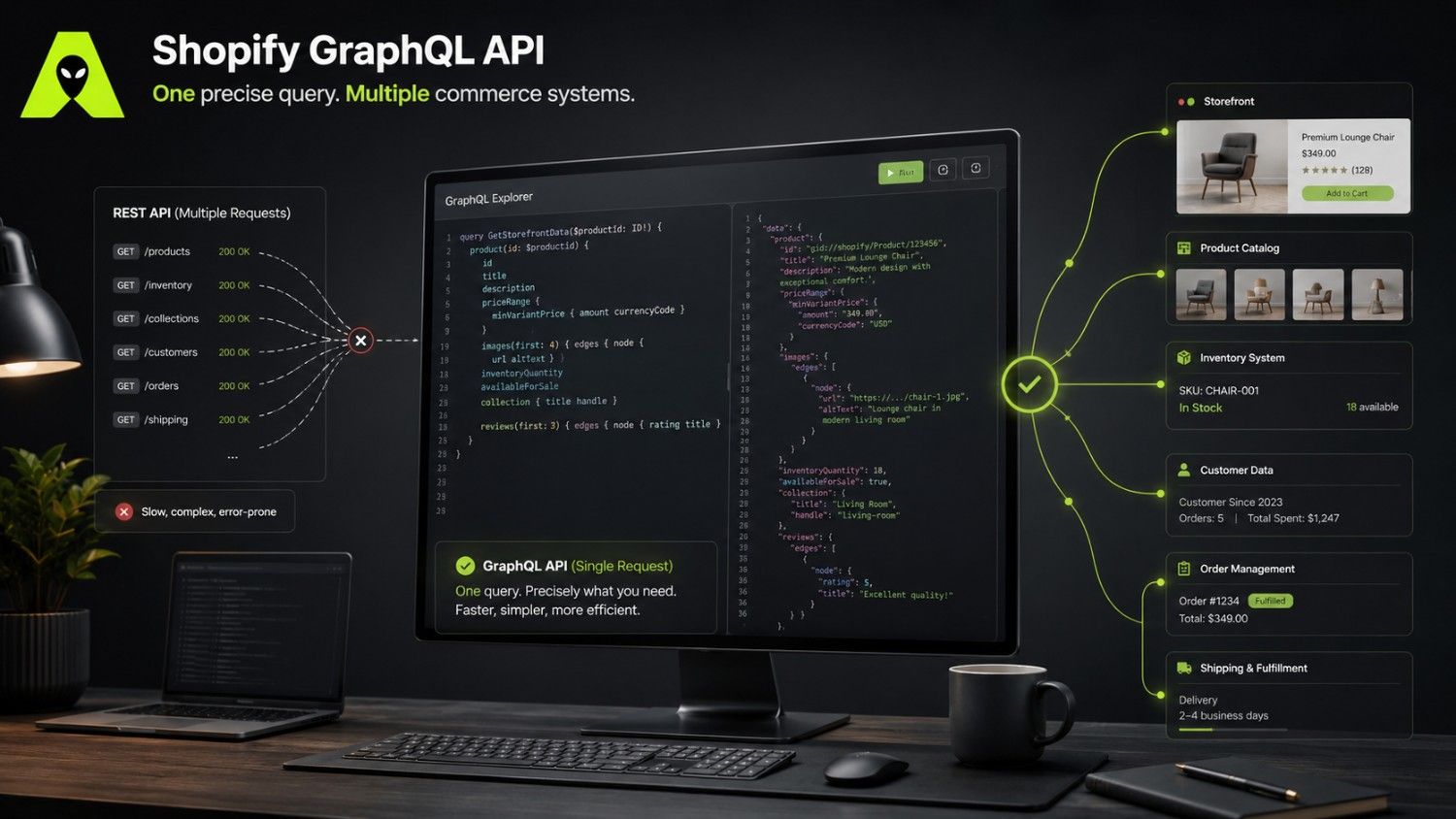
The Shopify GraphQL API lets developers request exactly the data they need in a single call, instead of stitching together several REST endpoints. A product page that once needed three or four REST requests — for pricing, variants, and inventory — can now pull all of it through one GraphQL query. As a result, apps load faster and servers handle less redundant traffic.
Shopify has also made its intentions clear: new features are shipped to the GraphQL Admin API first, and the REST Admin API is on a fixed deprecation path. In other words, any serious Shopify app development plan now needs to be built around GraphQL from day one.
The GraphQL vs REST API Shopify debate usually comes down to three practical differences. First, GraphQL returns precisely the fields requested, so payloads shrink and pages render faster. Second, GraphQL uses a single endpoint for nearly everything, which simplifies versioning and reduces the number of integrations to maintain. Third, Shopify's GraphQL API applies a query cost system rather than a flat rate limit, meaning complex queries consume more of your budget than simple ones.
That cost system trips up teams new to a Shopify GraphQL tutorial. Every field you request adds to the query's cost, and each store has a maximum cost per second. Consequently, well-structured queries — ones that avoid unnecessary nested fields — perform noticeably better than queries that pull everything "just in case."
A typical Shopify GraphQL query for product details might request the title, price, and available inventory in one call, filtering out any fields the app does not display. Because the response matches the request field for field, front-end teams spend far less time parsing unused data — a small change that compounds across thousands of storefront visits.
Before writing a single query, a proper Shopify API integration starts with three things: creating a custom or public app in the Shopify Partner Dashboard, generating the correct access scopes, and testing queries in the GraphiQL explorer built into Shopify's admin. Skipping the explorer step is one of the most common mistakes; it catches scope and syntax errors before they reach production code.
Rate limits and query costs should be monitored from the outset, not added later. Logging the "extensions.cost" field returned with every response gives your team early warning before a store hits its limit — particularly important for apps serving high-traffic Shopify stores across India and international markets, where traffic spikes around sales events can be sudden.
Largely, yes. Shopify has deprecated the REST Admin API on a fixed timeline, so new apps should be built on GraphQL. Existing REST integrations still work during the transition window, but planning a move to GraphQL sooner avoids a rushed migration later.
Only if you are building a customer-facing experience, such as a headless storefront or mobile app. Otherwise, the Admin API alone covers most back-office and app development needs.
Query cost is how Shopify measures the complexity of a GraphQL request rather than simply counting calls. Each store has a maximum cost budget per second, so efficient queries that request only needed fields run more reliably under load.
Yes. Many changes — such as syncing inventory or automating order updates — need only a handful of well-written queries. For anything beyond that, working with a Shopify development team keeps the integration efficient from the start.
The Shopify GraphQL API is no longer a niche tool for advanced developers — it is the direction Shopify itself is building toward. Store owners and developers who invest in understanding queries, cost limits, and the Admin-versus-Storefront distinction now will face far fewer surprises as REST support winds down.
If your team is planning a Shopify app or integration project, our earlier guide on Shopify AI commerce looks at how these same APIs feed the next generation of automated shopping experiences. For hands-on help with your own build, get in touch with the Alien Web Solutions team — we work with Shopify stores across India and internationally on exactly this kind of integration.
