

Shopify speed optimization is not a nice-to-have anymore; it directly decides whether a visitor stays or leaves. Studies consistently show that even a one-second delay can measurably cut conversions, and shoppers rarely wait around to find out if the next page loads faster. Meanwhile, Google factors page speed into rankings, so a slow store also loses visibility before a customer ever sees a product.
This guide breaks down what actually moves the needle: Core Web Vitals, image handling, app bloat, and theme choices. We work with stores across India and abroad, so the fixes below come from real audits, not guesswork. For broader design decisions, our Shopify theme customization guide is a useful companion piece.
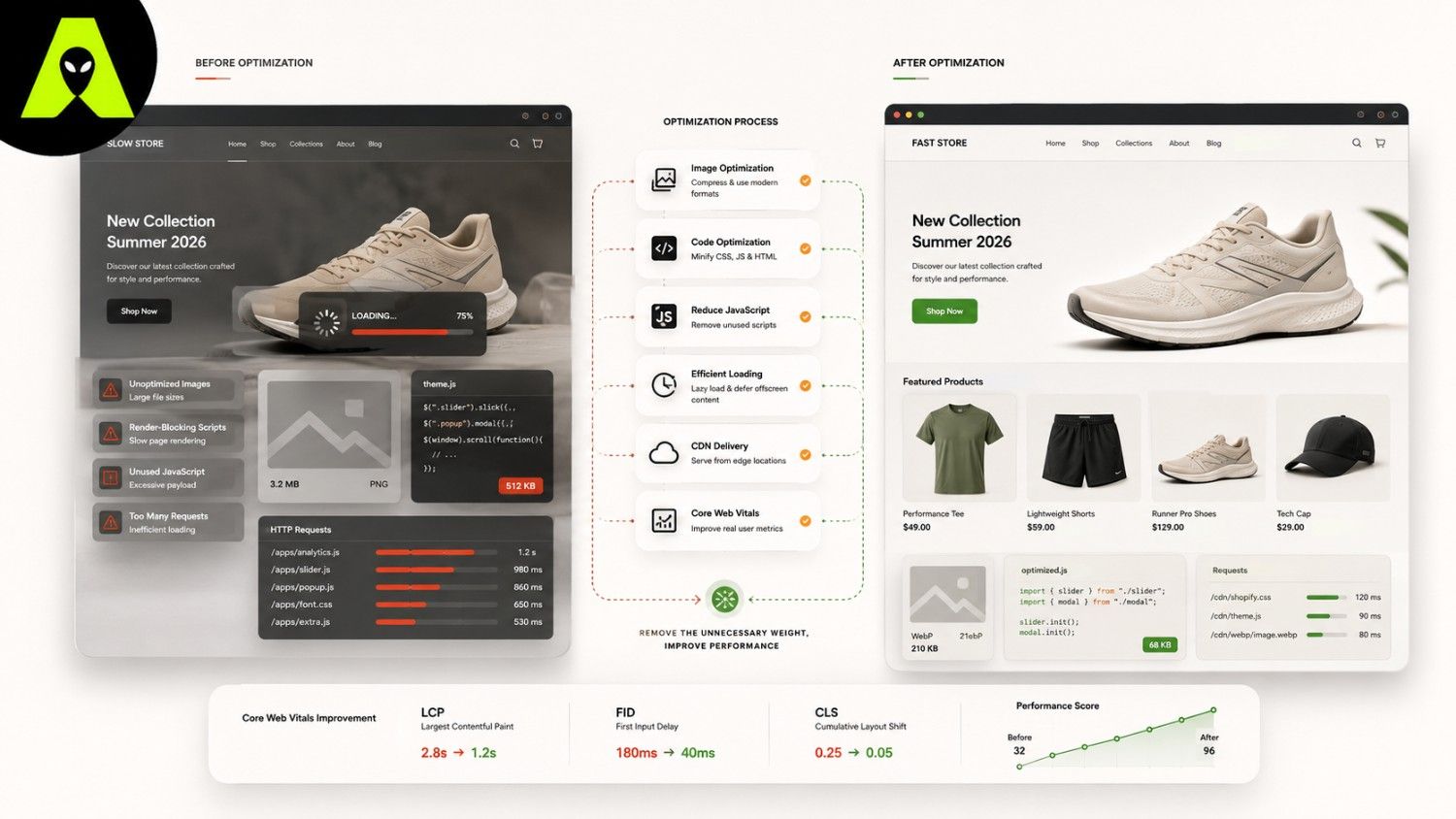
Before changing anything, measure what is actually slow. Google's Core Web Vitals give you three concrete numbers to track, and each one points to a different kind of problem.
Images are usually the biggest offender, so start there. Compress every product photo before upload, and rely on Shopify's built-in responsive image sizing instead of uploading one oversized file for every device. Next, audit your installed apps; each one adds its own scripts, and unused apps still slow down every page they touch, even sitting idle.
Finally, look at your theme itself. A visually rich theme can still load quickly if it is coded well, whereas a cluttered one will drag regardless of how optimized your images are. If you are weighing a redesign, our Shopify development services page covers how we approach performance during a rebuild.
Location changes the math slightly. A store serving mostly Indian customers should account for a wider mix of network speeds and devices, since mobile connections vary more than in markets with dense fibre coverage. A store shipping internationally, meanwhile, benefits most from a CDN, which Shopify already provides by default, so images and scripts load from a server near each visitor rather than one fixed location.
Either way, test from the actual regions your customers browse from, not just your own office connection. A page that feels instant locally can still lag noticeably elsewhere.
Aim for a Largest Contentful Paint under 2.5 seconds and an Interaction to Next Paint under 200 milliseconds. Stores hitting both figures tend to see noticeably better conversion rates.
Usually, yes. Every installed app adds its own script, so even a dormant app can quietly add load time. Reviewing and removing unused apps is one of the fastest wins available.
Often, yes. Image compression, app cleanup, and removing unused code usually deliver noticeable gains before a full theme change becomes necessary.
Shopify speed optimization rewards a measured approach: check your Core Web Vitals first, fix images and apps next, then reconsider your theme only if problems remain. Skipping straight to a redesign often wastes budget on a symptom rather than the actual cause.
If your store feels slow and you want a clear diagnosis before spending on fixes, get in touch with the Alien Web Solutions team — we will tell you honestly what is actually causing the delay.